Cash flow calendar
Income and bills on their dates, the balance in between
Cash flow is timing: money arrives on some days and leaves on others. Put each on its date, and the days between them show what your balance does — when it climbs, when it dips, and how low it goes.
Download on the App Store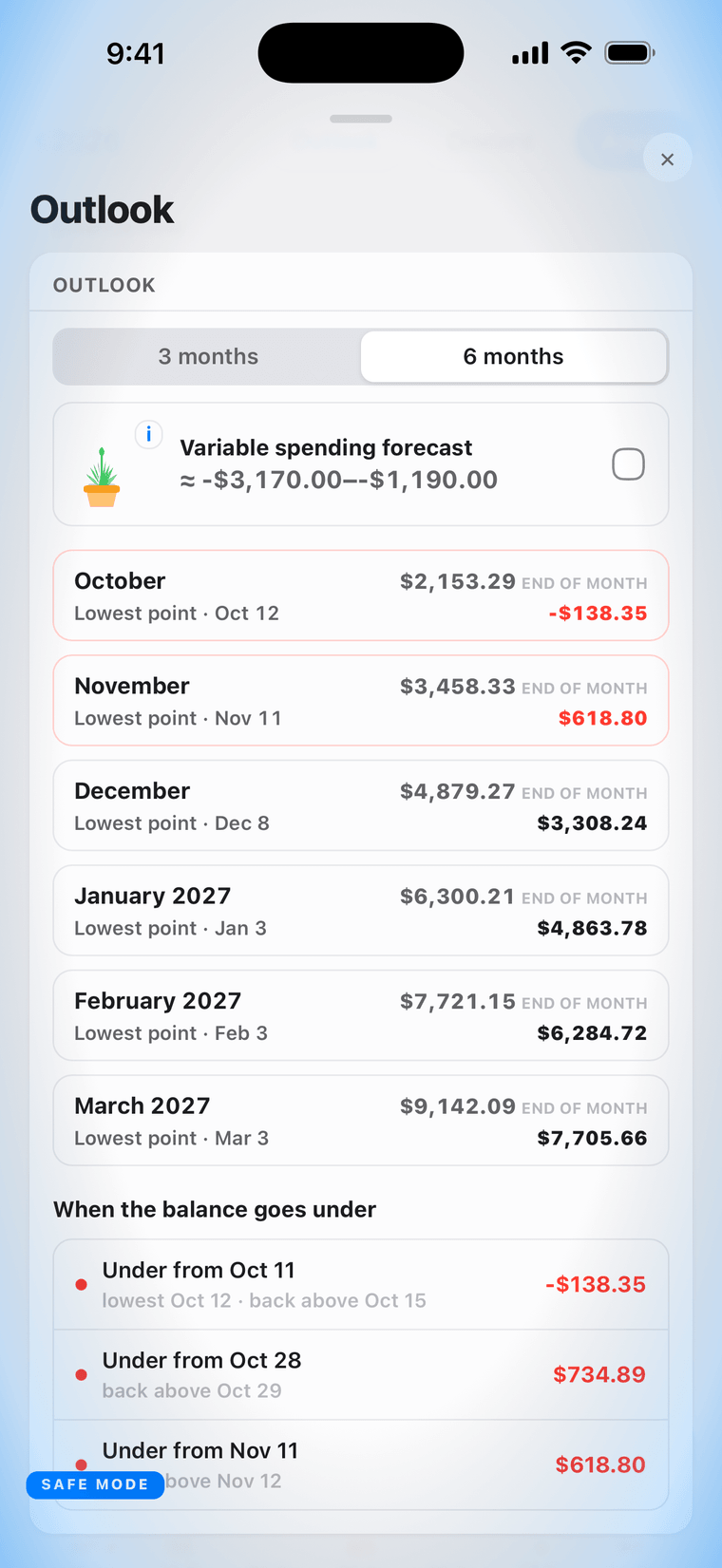
Every payment on its day
Add the paycheck once and say how often it comes — weekly, every two weeks, monthly — and the calendar places every payday ahead. Do the same with the rent, the phone, the car payment. One entry becomes a visible future.
The balance between the dates
Under every date sits the balance that day ends on. A day you have settled carries a green tick; a day whose balance falls below zero, or below your safety buffer, turns red. The stretch between a paycheck and the bills it has to cover is where you watch it happen.
Months ahead, on one screen
Outlook sums up the next three or six months: each month's closing balance, its lowest point and the date of it, and a list of the days the balance goes under.
Not a money problem. A timing problem.
The paycheck lands on the 15th; the rent leaves on the 1st. A cash flow calendar shows that gap before you are in it. It does not tell you what to do about it — that part stays yours.
Private by default
Local by default, and no account to start. Sync, when you turn it on, is end-to-end encrypted with a passphrase we cannot read or recover. No bank login — the app never asks for a bank's credentials.