What if?
Add it, watch the days repaint, decide
Before a big purchase the useful question is not whether you can pay for it today, but what it does to the days after it — the next bill, the next payday, the lowest point of the month.
Download on the App Store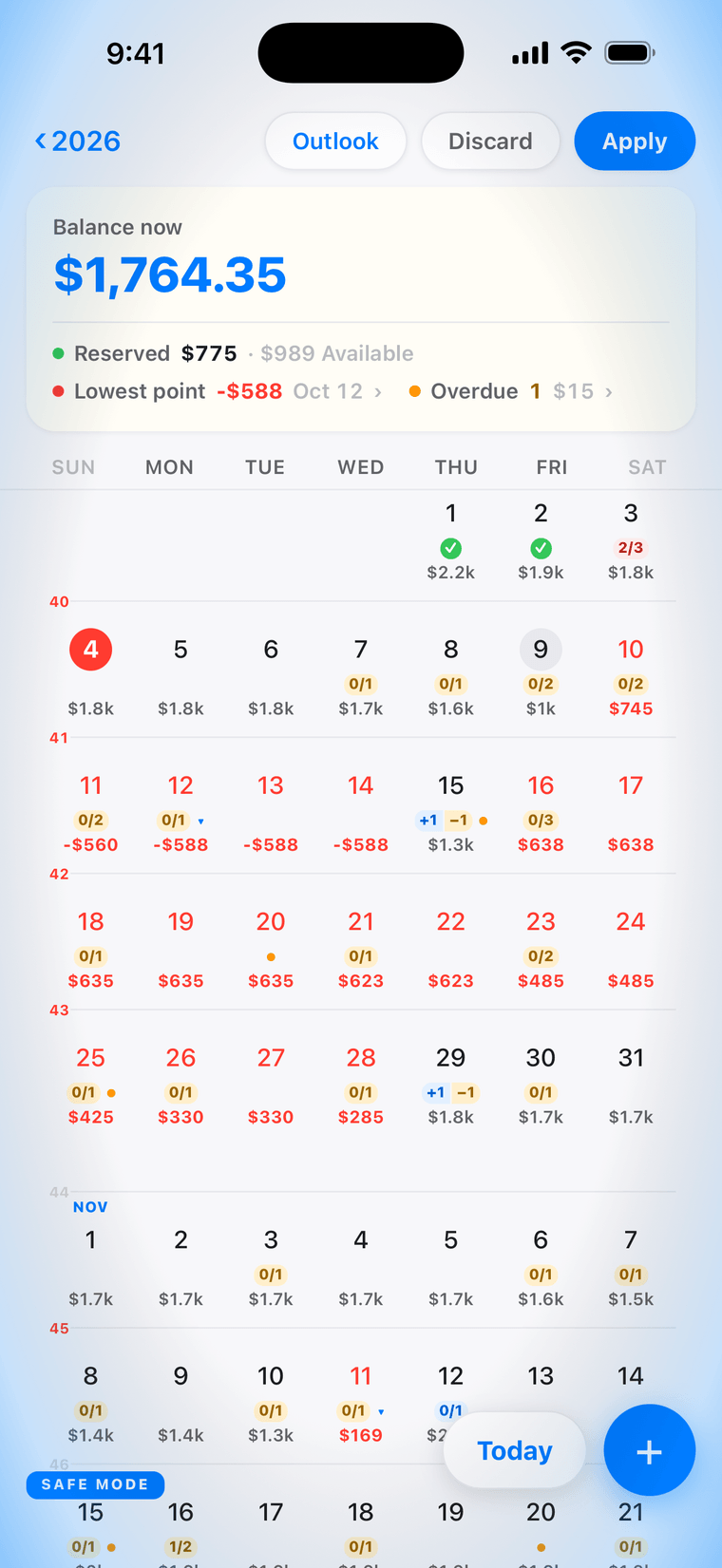
A safe mode for your plans
Tap What if? and the app enters a safe mode: the screen's edges glow, and every change you make — a purchase added, a payment moved, a bill deleted — is a test. The calendar redraws with it exactly as it would for real.
Every day after it
Add the purchase on its date and every day after it shows the new balance; if it reaches the lowest point of the month, the balance card moves with it. In this example a $450 sofa on October 9 takes the lowest point from −$138 to −$588, still on the 12th.
Outlook, Discard, Apply
Outlook shows the months ahead with the change in them. Discard puts everything back as it was. Apply keeps the change — and until you tap it, nothing is saved.
The decision stays yours
The app does not judge the purchase. It shows what the purchase does to each day; whether that is worth it is yours to say.
Private by default
Local by default, and no account to start. Sync, when you turn it on, is end-to-end encrypted with a passphrase we cannot read or recover. No bank login — the app never asks for a bank's credentials.